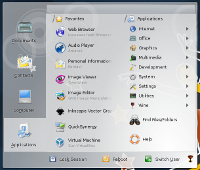
Lancelot is an application launcher menu (or ALI) for KDE Workspace designed to provide a place from which all your jobs begin. It provides quick access to applications, places, documents, contacts, and system information. It is Free/Libre Software published under GNU LGPL and GNU GPL.
In media
If you want a very powerful application launcher with more capability that the default one, use a launcher such as Lancelot.
~ Martyn Honeyford (IBM DeveloperWorks)
Lancelot is in many ways what Kickoff should have been
~ Bruce Byfield (Linux.com)
Yay for choice of application launchers. Yay for Lancelot.
~ Tom Albers
Features
- Optional no-click interface that allows you to navigate through the menu, and perform any action just by moving the mouse - without making a single click;
- Arranging the layout of the menu depending on the position of the menu button which activates it, so that the most used categories appear nearest to the mouse;
- Advanced search thanks to the integrated KRunner. So there is no need anymore for using two completely different applications that have basically the same purpose, but different approaches (although I do love KRunner);
- Ability to place parts of the Lancelot menu directly onto your desktop or panel just by drag and drop.
People
At the moment, I (Ivan Čukić) am the only developer behind this project. Obviously, there are a lot of people involved indirectly - from other Plasma developers, to people who helped me find the answer to life, the universe, and everything.
Contact
You can find me on IRC (#plasma channel) under a very obscure nickname - ivan|home (or ivan|away, or ivan|something else).